
Accessories for Wall Display 10"
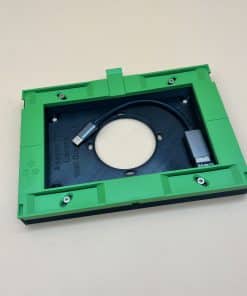
Adapter Loxone Wall Display 10″ for Switch Box and for LAN Adapter
incl. VAT
plus shipping
Accessories for Wall Display 10"
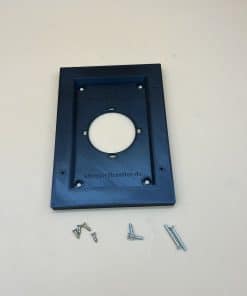
Adapter Loxone Wall Display 10″ for Switch Box and for Wi-Fi Adapter
incl. VAT
plus shipping



Accessories for the Loxone Wall Display 10″
The Wall Display 10″ is quickly installed – if the accessories fit. Three questions are decisive: how is the display connected, which box is in the wall and where do the 24 V come from? Here you will find the right parts; we make the adapters for the switch box ourselves.
What do I need? The overview
| Tree Turbo | LAN | Wi-Fi | |
|---|---|---|---|
| Network adapter | not needed | USB-C LAN Adapter | Wi-Fi Adapter Set |
| With flush-mounted housing | not needed | Flush-mounted housing – the LAN adapter fits inside | Flush-mounted housing – the Wi-Fi adapter fits inside |
| Without flush-mounted housing (60 mm switch box) | – | Adapter for switch box and LAN adapter (surface height 18 mm) | Adapter for switch box and Wi-Fi adapter (surface height 11 mm) |
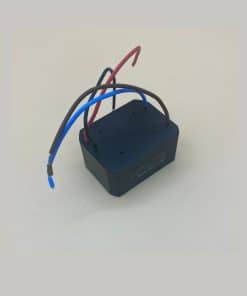
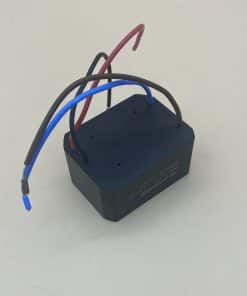
| Power supply | comes via the Tree Turbo cable – no power supply needed | Flush-mounted power supply (24 V / 15 W), sits in the flush-mounted housing or switch box – or 24 V via a cable to the mounting location | |
Connection: Tree Turbo, LAN or Wi-Fi
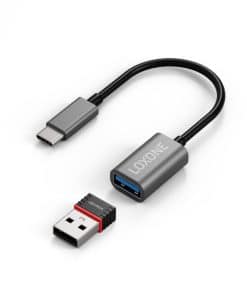
Tree Turbo is available on the Audioserver and the Miniserver Compact. If a Tree Turbo cable runs to the mounting location, you need neither a network adapter nor a power supply: Tree Turbo runs over two cores of the cable and the 24 V supply over two more. The Loxone Tree Cable or a CAT7 cable is ideal for this. If a network cable is in place, you connect the display with the USB-C LAN Adapter (10/100 Mbit/s, no separate power supply). If there is no data cable, use the Wi-Fi Adapter Set for the Wi-Fi connection.
Installation: flush-mounted housing or adapter for the switch box
With LAN or Wi-Fi, the adapter needs space behind the display. There are two ways to do this:
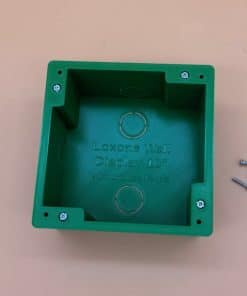
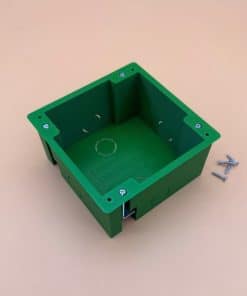
With flush-mounted housing: Our flush-mounted housing made of PETG (outside 110 × 110 × 60 mm, 6 knock-outs for conduit or cable up to 20 mm) also holds the LAN or Wi-Fi adapter. The flush-mounted power supply also fits inside. The display is mounted directly on it; no additional adapter is needed.
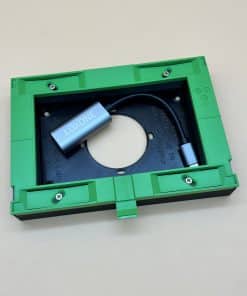
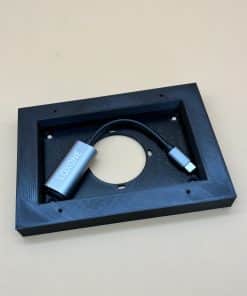
Without flush-mounted housing: If there is only a normal 60 mm switch box at that point, you place our adapter in front of it as a spacer frame. It creates space for the network adapter: the adapter for switch box and LAN adapter with 18 mm surface height or the flatter adapter for switch box and Wi-Fi adapter with 11 mm. The flush-mounted power supply then sits in the switch box. Both adapters can be fixed on the box or directly on the wall; screws and wall plugs are included.
Power supply
The Wall Display needs 24 V DC. With Tree Turbo it comes via the cable. With LAN or Wi-Fi, our flush-mounted power supply provides the supply if only 230 V is available at the mounting location: it delivers 24 V with 15 W – enough for the display (max. 13 W) – and sits in the flush-mounted housing or, without it, in the 60 mm switch box. If a 24 V cable already runs to the mounting location, you do not need a power supply.
Spare parts
You can also get matching replacement connectors and terminals for the power and Tree Turbo connections from us. You will find the display itself and other control devices in the category Loxone Displays.
Frequently asked questions
Do I need the flush-mounted housing?
Only if you connect the display via LAN or Wi-Fi and want the network adapter to disappear into the wall. Alternatively, you place our adapter as a spacer frame on a normal 60 mm switch box. With Tree Turbo you need neither.
Which adapter do I need for the switch box?
For LAN the adapter for switch box and LAN adapter (surface height 18 mm), for Wi-Fi the adapter for switch box and Wi-Fi adapter (surface height 11 mm). With the flush-mounted housing you do not need either of these adapters.
Do I need the flush-mounted power supply?
With LAN or Wi-Fi, yes, if only 230 V is available at the mounting location. With Tree Turbo, no, because the 24 V comes via the Tree Turbo cable. You can also do without it if a 24 V cable otherwise runs to the display.
Which cable do I need for Tree Turbo?
The Loxone Tree Cable or a CAT7 cable is ideal. Tree Turbo runs over two cores and the 24 V supply over two more – you then do not need a power supply at the mounting location.
Where does the flush-mounted power supply sit?
With the flush-mounted housing it sits in the housing; without it, in the 60 mm switch box behind our adapter. It is supplied with 18–264 V AC and delivers 24 V with 15 W.
What is included in the Wi-Fi Adapter Set?
An adapter from USB-C to USB-A and the Wi-Fi dongle. With it you connect the Wall Display to your Wi-Fi.
Is the display included with the accessories?
No, all parts are supplied without the Wall Display. You can get the display in the category Loxone Displays.
How quickly will my order arrive?
We usually ship items in stock on the day of the order (on Mondays for orders received by approx. 11 am, Tuesdays to Fridays by approx. 2 pm); delivery within Germany takes approx. 1–3 working days. If an item is not in stock in the quantity you want, we send the rest as quickly as possible and free of charge.
Your question was not answered?Write to us – we will be happy to help.
To the contact form