


Loxone displays: Touch Pure Display and Wall Display 10″
A display on the wall replaces the smartphone: you control lighting, shading, climate and music exactly where you need them – guests and children find their way around immediately too. The Touch Pure Display (Tree or Air) does this for individual rooms, the Wall Display 10″ as the central control point for the whole house. With our accessories from our own production, both sit neatly on the wall, and the Touch Pure Display Air can also stand on the table if you wish.
Touch Pure Display or Wall Display – the comparison
| Touch Pure Display Tree · Air | Touch Pure Display CO2 Tree · Air | Wall Display 10″ | |
|---|---|---|---|
| Ideal for | Room control next to the door | Room control with air quality, e.g. bedroom or study | Central control point for the whole house |
| Size | 90 × 90 × 16 mm | 90 × 90 × 16 mm | 250 × 160 × 16.9 mm |
| Connection | Loxone Tree or Loxone Air (depending on version) | Loxone Tree or Loxone Air (depending on version) | Tree Turbo (on Audioserver or Miniserver Compact), LAN or Wi-Fi via adapter |
| Wi-Fi | integrated, optional (e.g. for Intercom) | integrated, optional (e.g. for Intercom) | via Wi-Fi Adapter Set |
| Sensors | Temperature, humidity, brightness | Temperature, humidity, CO2 (400–5,000 ppm), brightness | Brightness |
| Power supply | 24 V DC, typ. 0.7 W (Eco), max. 3 W | 24 V DC, typ. 0.7 W (Eco), max. 3 W | 24 V DC, typ. 4.8 W, max. 13 W |
| Mounting | Mounting frame included, 68 mm device box recommended | Mounting frame included, 68 mm device box recommended | Mounting frame included; with LAN or Wi-Fi a 100 × 100 mm flush-mounted box is recommended, not needed with Tree Turbo |
| Price | from €416.50 incl. VAT plus shipping | from €464.10 incl. VAT plus shipping | €981.75 incl. VAT plus shipping |
Which display suits you?
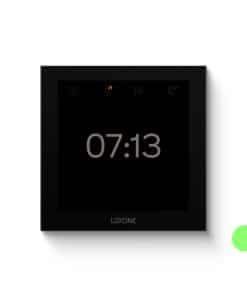
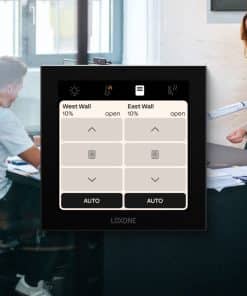
Touch Pure Display: The control device for every room. You control lighting, shading, audio and climate via a touch interface that you put together yourself in Loxone Config. The Tree version is connected to the Tree cable, the Air version communicates wirelessly with the Miniserver – both need power (24 V DC).
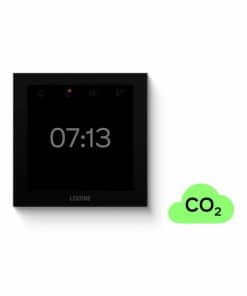
Touch Pure Display CO2: Like the Touch Pure Display, with an additional CO2 sensor. This lets your smart home know when to ventilate – ideal for bedrooms, children’s rooms and offices. Available as Tree and Air versions.
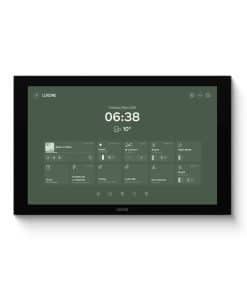
Wall Display 10″: The large control point with the familiar interface of the Loxone App – permanently installed, without battery and without tablet holder. Ideal for the entrance area, kitchen or living area.
Wall Display 10″: the right order in three steps
1. Decide on the connection: If a Tree Turbo cable runs to an Audioserver or Miniserver Compact, use Tree Turbo. If there is a network cable, use LAN with the USB-C LAN Adapter. If there is nothing and you do not want to chisel into the wall, use Wi-Fi with the Wi-Fi Adapter Set.
2. Decide on the installation: With LAN or Wi-Fi, the network adapter needs space behind the display. With our flush-mounted housing (110 × 110 × 60 mm) it sits in the box. If there is only a normal 60 mm switch box at that point, you place our adapter in front of it as a spacer frame – for the LAN adapter (18 mm) or the Wi-Fi adapter (11 mm). With Tree Turbo you need neither.
3. Clarify the power supply: The display needs 24 V. With Tree Turbo the 24 V comes via the cable – the Loxone Tree Cable or a CAT7 cable is ideal. With LAN or Wi-Fi, use our flush-mounted power supply; it sits in the flush-mounted housing or the switch box. If a 24 V cable already runs to the display, you do not need a power supply.
Accessories from our own production
We have developed our own accessories for the Touch Pure Display: the angle adapter, which angles the display by 25 degrees, frames for combining the Touch Pure and Touch Pure Display – straight, angled at the top or angled at the bottom –, an adapter frame with blank cover for retrofitters, as well as table housings for the Air version made of plastic or aluminium, each with a plug-in power supply. You will find the complete overview under Accessories for Touch Pure Display. For the Wall Display 10″ there are the flush-mounted housing, flush-mounted power supply and our adapters for the switch box – all together under Accessories for Wall Display 10″. You will find further parts under Loxone accessories and spare parts.
Loxone displays at Allroundbastler
As a Loxone Platinum Partner and the largest manufacturer of accessories for Loxone, we are happy to advise you by e-mail on your choice – whether a Touch Pure Display for every room or a Wall Display as the central control point. We ship items in stock within Germany in approx. 1–3 working days.
Frequently asked questions
What is the difference between the Touch Pure Display and the Wall Display 10″?
The Touch Pure Display (90 × 90 mm) is intended for controlling one room and has sensors for temperature and humidity, optionally also for CO2. The Wall Display 10″ (250 × 160 mm) is a large central control point with the Loxone App interface for the whole house.
Do I need a Miniserver for the displays?
Yes. Both displays are part of the Loxone system and always work together with a Miniserver.
What is the difference between Tree and Air on the Touch Pure Display?
The Tree version is connected via the Loxone Tree cable, the Air version wirelessly via Loxone Air. Both need a 24 V supply – the Air version is not battery-powered.
What do I need the CO2 version for?
The CO2 sensor measures air quality (400–5,000 ppm). This lets your smart home remind you to ventilate or control a ventilation system. The sensor calibrates itself during the first 12 hours; after that it should get fresh air at least once a week.
Can I connect the Wall Display to my Miniserver?
Tree Turbo is available on the Audioserver and the Miniserver Compact. If you have neither, you connect the Wall Display via LAN with the USB-C LAN Adapter or via Wi-Fi with the Wi-Fi Adapter Set.
Which accessories do I need for the Wall Display 10″?
For LAN the USB-C LAN Adapter, for Wi-Fi the Wi-Fi Adapter Set. The adapter needs space behind the display: either you fit our flush-mounted housing, in which it also sits, or you place our adapter for switch box and LAN adapter or adapter for switch box and Wi-Fi adapter on a normal 60 mm switch box as a spacer frame. With Tree Turbo you need neither. For the power supply with LAN or Wi-Fi you need the flush-mounted power supply, unless a 24 V cable runs to the display. With Tree Turbo the 24 V comes via the cable. You will find everything together under Accessories for Wall Display 10″.
Can I combine the Touch Pure and Touch Pure Display?
Yes. With our combination adapter frame you place both devices straight one above the other. If the display is to be angled, use the angle adapter top (display angled by 15 degrees) or the angle adapter bottom (display angled by 25 degrees).
Can I mount the Touch Pure Display at an angle?
Yes, with our Angle Adapter Touch Pure Display the display sits on the wall angled by 25 degrees – making it easy to read from above or when passing by. In combination with a Touch Pure there is the angle adapter top (15 degrees) and the angle adapter bottom (25 degrees).
Can I mount the displays outdoors?
No. Both displays have protection class IP20 and are intended for dry indoor rooms only.
You will find even more answers in the “FAQ” tab of the Touch Pure Display Tree and Air and the Wall Display 10″.
How quickly will my order arrive?
We usually ship items in stock on the day of the order (on Mondays for orders received by approx. 11 am, Tuesdays to Fridays by approx. 2 pm); delivery within Germany takes approx. 1–3 working days. If an item is not in stock in the quantity you want, we send the rest as quickly as possible and free of charge.
Your question was not answered?Write to us – we will be happy to help.
To the contact form